
QuickBooks Desktop Support in Seattle, WA
Navigate QuickBooks Desktop challenges with ease and confidence.
Troubleshooting
Guidance
Solutions

Navigate QuickBooks Desktop challenges with ease and confidence.
A QuickBooks Desktop problem rarely waits for a convenient day. A company file that will not open stops invoicing. A failed payroll update blocks the next pay run. A multi-user error locks the bookkeeper out while the owner keeps working. And since May 31, 2026, a fourth problem has hit every Seattle office that never upgraded from QuickBooks Desktop 2023: Intuit shut off live support, payroll tax calculations and bank feeds for that version on the same day.
This guide shows you which kind of help your problem needs, what you can safely try first, how Washington's payroll and sales tax rules change the support picture, and how to check a Seattle-area provider before you give anyone remote access to your books. Product facts link to Intuit's own support pages. Washington figures link to the state agency or city office that sets them. We checked each link on Sept. 11, 2026.
Seattle businesses have four realistic routes. Most problems belong to one of them. Some need two.
RouteBest forHow to reach itCostIntuit support (official)Installs, activation, licenses, billing, product bugs, payroll service errorsInside QuickBooks, choose Help > QuickBooks Desktop Help/Contact Us, then pick a callback or chatNo extra charge with an active subscription on a supported versionIndependent QuickBooks specialist or ProAdvisorHands-on repair, setup, cleanup, training, Washington payroll setupDirectly, or through Intuit's Find-a-ProAdvisor directoryHourly or fixed fee; ask for a written quoteIT providerServers, Windows permissions, firewalls, hosting, backups, network errorsYour IT contract or a local IT firm that names QuickBooks DesktopMonthly managed-IT contract or hourly; ask for the minimum chargeYour CPA or bookkeeperWrong balances, reconciliations, payroll tax filings, sales tax returnsYour existing firmTheir hourly or monthly rate; ask whether QuickBooks help bills separately
Intuit support hours (Pacific time): weekdays 6 a.m. to 6 p.m. for all Desktop products (Assisted Payroll 5 a.m. to 7 p.m.); weekends 6 a.m. to 3 p.m. for Enterprise and Assisted Payroll only, per Intuit. A Seattle retailer or restaurant that runs Pro Plus or Premier Plus and closes its books on weekends needs a specialist's number for Sunday problems, because Intuit will not answer for that edition until Monday.
Intuit's support directory lists phone numbers for sales, Enterprise purchases and cancellations, but no public number for QuickBooks Desktop technical support. Official help starts inside the product. A website or ad that offers "QuickBooks Desktop support" through a toll-free number is not Intuit, whatever its colors suggest.
Press F2 (or Ctrl+1) inside QuickBooks. The Product Information window shows your version year and release. That screen answers the most important support question of 2026: whether Intuit still services your copy.
VersionStatusWhat still worksQuickBooks Desktop 2024 (Plus 2024, Enterprise 24.0)Supported; Intuit has published no end dateLive support, security updates, payroll and online services with an active subscriptionQuickBooks Desktop 2023 (Plus 2023, Enterprise 23.0)Discontinued May 31, 2026No live support, security updates, payroll, Desktop Payments, online banking downloads or emailed forms2022 and olderDiscontinuedSame losses as 2023
Keep three more facts in mind before you pay for any fix:
Subscribers on 2022 or 2023 can move to the 2024 platform through their subscription at no extra cost. For many offices, that upgrade is the entire repair.
If your Desktop Plus or Enterprise subscription lapses, Intuit offers a view-only mode for one year. Switch the file to single-user mode before the subscription ends, because view-only mode might not work in multi-user mode. You can then open the file and run reports, but nobody can enter transactions, open attachments or use third-party apps. View-only mode does not survive a reinstall. If you plan to let a subscription lapse after moving to another system, export the reports you need first. Intuit lists 800-591-0302 for renewals on that page.
QuickBooks Desktop 2024 requires natively installed 64-bit Windows 11, or Windows Server 2016, 2019 or 2022, with at least 8 GB of RAM and 16 GB recommended. Intuit lists ARM processors, Windows S mode, Linux, emulators and virtual environments as unsupported. Microsoft ended Windows 10 support on Oct. 14, 2025, and Intuit stopped supporting QuickBooks Desktop on Windows 10 the same day. Intuit warns that Windows 10 computers now carry higher security risk, so plan the Windows 11 move before you call support about a Windows 10 machine.
The ARM rule matters when you buy laptops. Some current Windows machines, including certain Microsoft Surface models, run on Snapdragon ARM chips. Check the processor line on the spec sheet before you buy a bookkeeper's new computer.
With 2023 discontinued and Plus closed to new buyers, a support problem is a good time to decide whether to keep fixing Desktop at all. Use this comparison before you spend money on repairs to an aging setup.
OptionChoose it whenTrade-offsStay on Desktop Plus 2024 (renew)Your current edition covers your needs, you stay within its user limit (three for Pro Plus, five for Premier Plus), and your workflows depend on Desktop featuresIntuit no longer sells Plus to new customers and has not published an end date for 2024. Weekend support is not available.Move to Desktop EnterpriseYou need more users (Diamond supports up to 40), advanced inventory or pricing, weekend support or Priority CircleHigher cost; Intuit lists pricing as "starting at" with custom quotes. Gold and Platinum include Enhanced Payroll, plus up to 3peremployeepermonth;DiamondincludesAssistedPayrollat3peremployeepermonth;DiamondincludesAssistedPayrollat2.50 per employee per pay period.Switch to QuickBooks OnlineYou want browser access, no server and automatic sales tax rate lookupsDifferent feature set; conversion needs planning, and some Desktop reports and workflows do not carry over
Intuit's QuickBooks Data Services team can repair broken files, move books from an old Desktop version to a current one, or move books from Desktop to QuickBooks Online. You start a case through Intuit support. Intuit's FAQ does not publish a price, so ask for one before you approve the work.
Our recommendation: Upgrade any 2022 or 2023 file to the 2024 platform now, because a discontinued version leaves payroll and banking exposed. Then treat the Desktop-versus-Online decision as a planned project on your own calendar, not an emergency choice during a support call.
Every support problem sits in one of three layers: the program (QuickBooks itself), the file (your company data) or the environment (Windows, the network, the printer or the server). The layer tells you who to call.
ProblemLayerUsually fixed byIntuit's first toolInstall fails, error 3371, activation problemsProgramIntuit or a specialistTool Hub > Installation Issues > Install Diagnostic ToolQuickBooks will not start or freezes on launchProgramIntuit or a specialistTool Hub > Program Problems > Quick Fix my ProgramCompany file will not open or reports damageFileSpecialist or IntuitVerify Data, Rebuild Data, File DoctorErrors H202, H505, H101 or H303EnvironmentIT provider or specialistTool Hub > Network Issues; Database Server ManagerUpdate or payroll tax table fails to downloadProgram or subscriptionIntuitHelp > Update QuickBooks DesktopPrinting or save-as-PDF failsEnvironment or programSpecialist or ITTool Hub > Program ProblemsBank feeds stop downloadingSubscription or versionIntuitVersion check firstWashington premiums calculate wrongFile setupSpecialist or CPAPayroll Item List reviewSlow performance with several usersEnvironment or fileIT provider and specialistServer resources, file size reviewBackup fails or a restore will not openFile or environmentSpecialist or ITFile > Back Up Company; restore a .QBB
The QuickBooks Tool Hub remains Intuit's main self-help utility, and Intuit has not retired it. You download it separately from QuickBooks, and Intuit recommends running it on 64-bit Windows 11.
These steps come from Intuit's published troubleshooting and carry little risk to your data. Before you start, make a backup through File > Back Up Company if QuickBooks still opens. If it does not, copy the whole company file folder to another drive.
Likely cause: a damaged program component, a stuck background process or an interrupted update.
If that fails: Request an Intuit callback from another computer's Help menu, or book a specialist to repair the installation.
Likely cause: the wrong file, a location QuickBooks cannot reach or data damage.
If that fails: Run File Doctor from the Tool Hub's Company File Issues tab. If QuickBooks opens but shows damage, go to Window > Close All, then File > Utilities > Verify Data.
If Verify Data reports that your data "has lost integrity," Intuit's next step is Rebuild Data. Rebuild makes you save a backup first. Save it under a new name so you keep your older backup. Customers on Desktop Payroll Assisted should contact Intuit before they rebuild.
If a rebuild fails, QuickBooks Pro, Premier and Enterprise for Windows keep an Auto Data Recovery copy beside the company file, unless the backup exceeds 1.5 GB. Intuit's recovery steps work on copies in a test folder, and a specialist can run them with you.
Likely cause: something blocks the workstation's connection to the computer that hosts the company file.
If that fails: The firewall is the usual suspect. QuickBooks Desktop 2019 and later use dynamic ports that the installer assigns, so a port list from an old article will not match your office. Database Server Manager's Port Monitor tab shows the real port. Give that number to your IT provider.
Likely cause: a discontinued version, an inactive subscription or a blocked connection.
If that fails: On a supported version, contact Intuit. Subscription and entitlement problems live on Intuit's side.
Likely cause: a Windows printer driver or a damaged PDF component.
If that fails: Run the PDF and print repair under the Tool Hub's Program Problems tab. If other programs print and QuickBooks still does not, call a specialist.
Skip any online instruction that tells you to edit the Windows registry, delete files from the QuickBooks program folder, run command-line tools from a forum post or open your company file in a database utility. Leave the transaction log file (.TLG) alone. It holds the changes you made since your last backup, and deleting it can cost you that work. When Intuit's published steps stop working, call for support instead of experimenting.
A prepared caller often finishes in one session. Gather these items before you contact Intuit or a specialist:
ItemWhere to find itProduct, version, release, license and product numbersPress F2Company file locationF2 windowExact error text and codeA screenshot of the messageWhen the problem started and what changedUpdates, new computers, new printers, server work, power outagesWhich computers and users have the problemAsk your teamWindows version on each affected computerSettings > System > AboutWhich computer hosts the fileYour IT notes or the server nameNewest good backupFile name and date of the latest .QBBPayroll service, if the problem touches payrollEnhanced or Assisted; date of the last successful pay runSteps that trigger the problemWrite them in order
Error codes look the same in every state. Washington adds a second layer: payroll premiums, hours-based reporting and destination-based sales tax that QuickBooks Desktop does not set up on its own. When a Seattle paycheck looks wrong, check the setup against the rules below before you report a software defect.
Washington has no state income tax, so QuickBooks withholds none. The state requires other payroll items that employers in most states never set up.
Program2026 ruleQuickBooks Desktop setupPaid Family and Medical Leave (PFML)1.13% of wages up to the Social Security wage base, $184,500 in 2026; employees pay 71.43% and employers 28.57%Items "WA – Paid Fam Med Leave Emp" and "WA – Paid Fam Med Leave Co" appear on each employee's Other tax tab after a payroll update. Answer "No" when QuickBooks asks whether the rate is part of the unemployment rate. (Intuit steps)WA Cares Fund0.58% of gross wages with no wage cap. Employees pay; employers withhold.Payroll item "WA – Cares Fund" at 0.58%. Delete the item from an exempt employee's Other tax tab. (Intuit steps)Workers' compensation (L&I)Premiums depend on hours worked, not wages. Workers pay part of the premium. L&I's average rate rose 4.9% for 2026.Two items, a company contribution and an employee deduction, and both calculate from hours. (Intuit steps)Unemployment insurance (ESD)Taxable wage base $78,200. New employers pay 115% of their industry's average rate.Enter your ESD rate by hand. QuickBooks does not download state unemployment rates.Occupation codesESD requires a Standard Occupational Classification (SOC) code or job title for each employee.Employees > Payroll Setup > Employee Setup > Tax details > Additional state employment details > Occupational Code (Intuit steps)
A worked check for PFML and WA Cares. Take a Seattle employee with a $1,000 gross paycheck at a company with 30 employees:
If QuickBooks withholds less than 8.07inPFMLper8.07inPFMLper1,000 of 2026 wages below the cap, the file still carries an old rate, unless your company chose to pay part of the employee share. Run the payroll update, then check the rate under Employees > Employee Center > Payroll Info > Taxes > Other.
Two 2026 changes create new support questions:
Decide how your file records salaried hours. ESD, Paid Leave and L&I all ask for hours. ESD tells employers to report 40 hours per week for full-time salaried employees who do not track time. L&I accepts either actual hours or 160 assumed hours per month for salaried staff, and every salaried employee must use the same method. A technician will ask which method your file uses, so settle it before the session.
Intuit's state e-file table lists Washington unemployment as "E-file/e-pay separately." The other Washington programs sit outside QuickBooks.
FilingWhere you fileWhat QuickBooks Desktop doesUnemployment tax and wage reportESDHandles e-file and e-pay as separate stepsPFML and WA Cares report and premiumsPaid Leave, through SecureAccess WashingtonCalculates and withholds; you report by manual entry (up to 50 employees) or CSV upload (Paid Leave)Workers' compensation quarterly reportL&ICalculates premiums by hours; you file and pay on L&I's siteFederal Forms 941 and 940, Form W-2IRS and Social Security AdministrationEnhanced e-files; Assisted files for you
All three Washington reports fall due on the same dates: April 30, July 31, Oct. 31 and Jan. 31. A provider who promises that QuickBooks Desktop will "file everything automatically" in Washington has not worked with the state's system.
QuickBooks Desktop does not track an employee's work city for minimum wage, so you set pay rates by hand. Seattle's minimum wage is 21.30](https://www.seattle.gov/laborstandards/ordinances/minimum−wage)in2026foreveryemployersize,andtipsandhealthbenefitsdonotcounttowardit.The[stateminimumis21.30](https://www.seattle.gov/laborstandards/ordinances/minimum−wage)in2026foreveryemployersize,andtipsandhealthbenefitsdonotcounttowardit.The[stateminimumis17.13, and the state's exempt salary threshold is $1,541.70 per week. Tukwila, Renton, Burien, Everett and unincorporated King County set their own higher rates, SeaTac sets one for hospitality and transportation employers, and Bellevue uses the state rate. Check L&I's local rate table for staff who work outside Seattle.
Seattle's payroll expense tax applies only to large payrolls, and the law bars employers from withholding it from workers. It should never appear as an employee deduction item in QuickBooks.
Washington charges sales tax based on where the customer receives the goods or service, not where your office sits. A Seattle business that delivers to Bellevue, Renton and Tacoma needs a different rate for each destination. Seattle's combined rate rose to 10.55% on Jan. 1, 2026, from 10.35%.
QuickBooks Desktop does not look up Washington rates. Its sales tax setup relies on sales tax items and group items you create. The Washington Department of Revenue fills the gap with a free quarterly rate file built for QuickBooks Desktop Pro, Premier and Enterprise:
The department warns: "Tax rates change quarterly!" Put the download on your calendar for the first week of January, April, July and October. If invoices show the wrong sales tax, check this file's date before you call for support.
Since Oct. 1, 2025, Washington's retail sales tax applies to information technology services. The Department of Revenue's list includes help desk services, remote training and services that "troubleshoot hardware and software issues." Bookkeeping and accounting services are not on the list of newly taxable services, and the department has not issued guidance that names QuickBooks support specifically.
In practice, a technical support or training invoice may carry sales tax, while a bookkeeping invoice may not. If the service is taxable, a 500troubleshootinginvoiceforaSeattleofficewouldadd500troubleshootinginvoiceforaSeattleofficewouldadd52.75 at the 10.55% rate. Ask each provider whether its quote includes Washington sales tax, so you compare real totals.
SituationBest fitInstall, update, error message or file damage on one computerRemoteCleanup or training for one bookkeeperRemote, unless the person learns better in personMulti-user setup after a server changeOnsite, or remote with your IT provider on siteNew server, network hardware or office moveOnsiteComputer cannot boot or reach the internetOnsite
Before a remote session, confirm the provider's identity through a phone number you found yourself, use a tool you or your IT provider trust, watch the session and end it when the work ends. Remove any unattended-access software afterward unless you agreed to keep it.
A note on hosting. Some Seattle IT firms offer to host QuickBooks Desktop files in a data center. Intuit's system requirements list virtual environments as unsupported, but Intuit keeps a list of authorized hosting providers and says it does not endorse or guarantee them. On a hosted setup, Intuit may require your IT administrator or a representative of the host to join the support call. Before you move files, ask the host whether it appears on Intuit's list and who you call when the setup breaks.
Searches for local QuickBooks help mix local firms, national call centers and pages built to look local. A few checks separate them.
None of the five providers listed below publishes an hourly rate, so collect quotes on the same basis:
Cost itemWhat to ask or checkIntuit supportNo extra charge with an active subscription on a supported versionIntuit Data ServicesPrice not published; ask before approvingSpecialist or IT timeHourly rate, minimum billing increment, travel feeFree consultationSome providers offer one; confirm the lengthWashington sales tax10.55% in Seattle on taxable IT servicesSoftwareDesktop Payroll Enhanced lists at 70permonthplus70permonthplus7 per employee; Intuit quotes Enterprise pricing by request
On Sept. 11, 2026, we searched for QuickBooks Desktop support, consultants and ProAdvisors in Seattle and nearby cities and reviewed the websites of more than 20 firms. The table keeps the five whose own sites name QuickBooks Desktop or its editions and show a Washington address. We excluded firms based outside Washington, firms whose sites mention only QuickBooks Online and sites with no local address or a toll-free number repeated across many city pages. No provider paid for inclusion, and a listing is not an endorsement. We did not verify credentials, Intuit relationships or current availability. Run the checks above before you hire anyone.
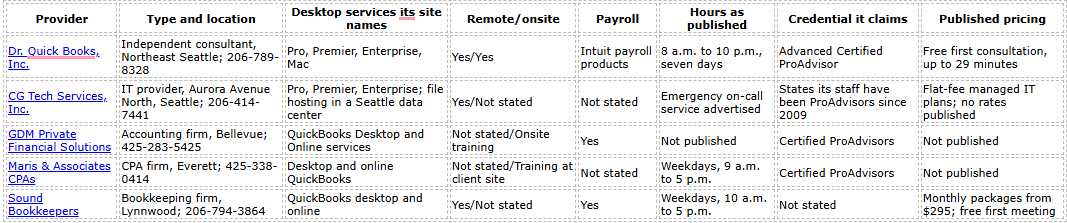
Sound Bookkeepers' hours come from its Contact page, and its site lists two Lynnwood addresses, so confirm before a visit. Contact details change. Use each firm's current website, and apply the 10 questions to any provider, listed here or not.
Most Seattle-area college QuickBooks courses now teach QuickBooks Online; Seattle Central College's online course says desktop versions will not work with it. Bellevue College's ACCT 272 is the exception we found: its 2025-26 catalog entry covers QuickBooks Premier, a Desktop edition. Confirm the version before you enroll. For a team that already runs Desktop, one-on-one training inside your own company file usually transfers faster to daily work.
QuickBooks company files hold bank details, employee Social Security numbers and payroll records, which makes "QuickBooks support" a common scam target. When we searched for Seattle QuickBooks support in September 2026, the results included three warning patterns:
Intuit says it will never ask for personal information, sign-in or password details, or banking or credit card information by email, and it does not send "software update" attachments. Genuine Intuit email comes from an @intuit.com address. The Federal Trade Commission adds that legitimate tech companies do not contact you out of the blue about a computer problem, and that scammers push payment by gift card, wire transfer, cryptocurrency or payment app.
Stop and verify if anyone:
A legitimate technician can finish almost any repair while you stay signed in and watch. If you already gave a stranger remote access, disconnect the computer from the internet, change your Intuit, email and banking passwords from another device, call your bank and have an IT professional check the computer. Forward suspicious Intuit-branded email to security@intuit.com, and report scams at ReportFraud.ftc.gov.
Start with the F2 screen. A 2023 or older version loses support, payroll tax calculations and bank feeds at once, and the 2024 upgrade costs subscribers nothing extra. Use Intuit for anything tied to your license, subscription or payroll service, and use Intuit's Tool Hub before you pay anyone. Before you call anyone about payroll or invoices, confirm your PFML rate and the date of your state sales tax file. Hire a QuickBooks Desktop specialist when the fix lives inside your file or your Washington payroll setup, and bring in IT when the problem follows the network rather than the program. Whoever you choose, verify the business yourself, get the price and the sales tax in writing, and never hand over a password to finish a repair.
Open QuickBooks and choose Help > QuickBooks Desktop Help/Contact Us, or press F1, then select Contact Us to request a callback or start a chat. Intuit does not list a public technical support phone number for QuickBooks Desktop.
Use Intuit when the problem involves your license, subscription, a product defect or the payroll service. Use a specialist when you need someone to work inside your file, set up Washington payroll items, clean up records or train staff. When you cannot tell which, start with Intuit's free support. If the agent cannot reproduce the problem, move to a specialist.
A specialist can reconcile and clean up records, set up payroll items and sales tax groups, train your staff on your own company file, redesign multi-user setups with your IT provider and stay with a problem across several sessions. Intuit's agents focus on the software and your account.
The file still opens in 2023, but Intuit no longer supports that version. Subscribers can upgrade to the 2024 platform at no extra cost, and QuickBooks converts the file during the upgrade.
From Intuit, only QuickBooks Desktop Enterprise and Desktop Payroll Assisted customers can, from 6 a.m. to 3 p.m. Pacific time. Pro Plus and Premier Plus users need an independent specialist for weekend problems. Of the five providers in the table, Dr. Quick Books publishes seven-day hours (8 a.m. to 10 p.m.), and CG Tech Services advertises emergency on-call service. Ask whether that service covers customers without a managed-IT contract.
Intuit's own troubleshooting tools, including the Tool Hub, File Doctor and Rebuild Data, cost nothing. When those tools fail, Intuit support can open a case with QuickBooks Data Services, which repairs files and converts data. Intuit does not publish a price for Data Services, so ask for one before you approve the work.
Intuit offers view-only mode for one year after a Desktop Plus or Enterprise subscription ends. You can open the file in single-user mode and run reports, but nobody can enter transactions. Reinstalling QuickBooks ends view-only access.
Yes. Intuit supports the payroll service itself. For Washington setup, including PFML, WA Cares, hours-based workers' compensation and SOC codes, a QuickBooks specialist or a CPA with Washington payroll experience is the better fit.
Have the F2 screen details, the exact error message, the list of affected computers, your newest backup and a note of recent changes. The checklist earlier in this guide covers the rest.
Reach Intuit only through the QuickBooks Help menu or Intuit's website, never give remote access to someone who contacted you first, and verify a provider's license and credentials before you pay.